Linker scripts and the memory map: why firmware won't boot
A surprising amount of “my firmware is bricked” turns out to be a memory-layout
problem, not a logic bug: it links without error, flashes fine, and then the chip
faults before main() — or a global variable is mysteriously garbage. The linker
script and the startup code are the least-understood part of an embedded project
precisely because the toolchain hides them in a template that “just works” — until it
doesn’t. Understanding the memory map they build is what turns those failures from
mysteries into five-minute fixes.
Where everything lives
Your program isn’t one blob. The compiler splits it into sections by what the data is and where it must live, and the linker places each section into FLASH or RAM:
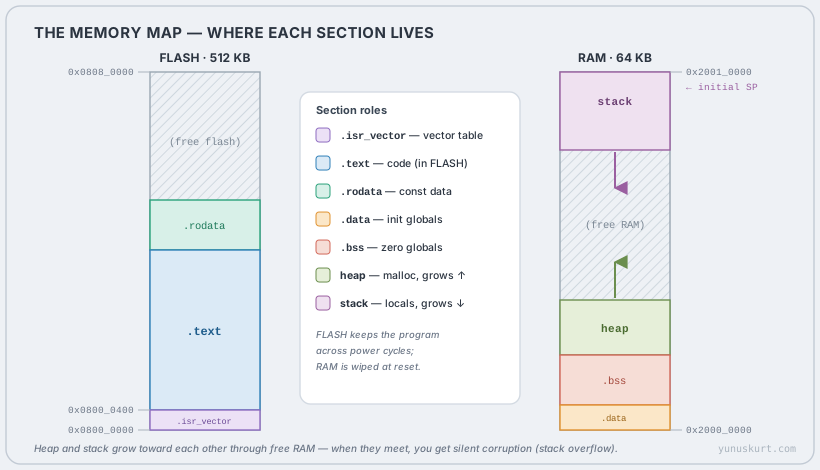 Figure 1 — The classic Cortex-M map. Code and constants live in FLASH; mutable data lives in RAM, with the heap growing up and the stack growing down toward each other.
The five sections you meet constantly:
.isr_vector— the vector table: the initial stack pointer and the address of every interrupt handler. It must sit at the start of FLASH (where the CPU looks on reset)..text— your code. Read-only, runs straight from FLASH..rodata—constdata and string literals. Read-only, stays in FLASH..data— global/static variables with a non-zero initial value (int x = 5;). Here’s the catch: they have to be writable, so they run in RAM — but their initial values have to survive power-off, so they’re stored in FLASH..bss— global/static variables that start at zero (int y;). They take no space in the FLASH image at all; they just need to be zeroed in RAM at startup.
FLASH is non-volatile and keeps the program across power cycles; RAM is random at power-on. That difference is the whole reason startup code exists.
What runs before main()
Between reset and your first line of main(), the Reset_Handler (startup code)
has to turn that random RAM into the state C promises you — globals initialised, zeros
zeroed:
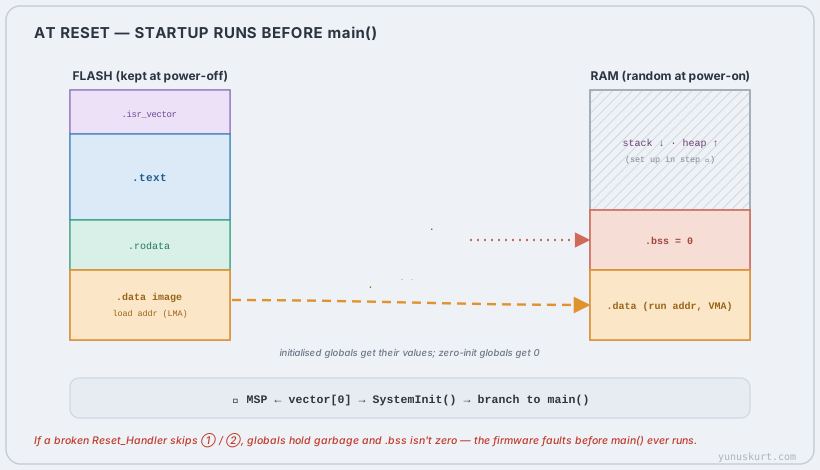 Figure 2 — The startup sequence. Copy
 .data’s initial values from FLASH to RAM, zero .bss, set the stack pointer, then call main(). Skip the copy or the zero and your globals are wrong before line one.
Three steps, in order:
- Copy
.datafrom FLASH to RAM. The initial values were stored in the FLASH image (their load address); the startup loop copies them to where the variables actually live in RAM (their run address). This is whyint x = 5;is5whenmain()starts. - Zero
.bss. Walk the.bssregion in RAM and write zeros, sostatic int y;really is0as the C standard requires. - Set up and go. The initial stack pointer is loaded from the vector table (the
CPU does this in hardware on Cortex-M),
SystemInit()configures clocks, and then control branches tomain().
If a hand-rolled or mismatched Reset_Handler skips step 1, every initialised global is garbage. Skip step 2 and your “zero” variables hold whatever was in RAM at power-on — the kind of bug that changes with temperature and ambient noise. Both look like the firmware “doesn’t boot.”
VMA, LMA, and the linker script
That FLASH-stored-but-RAM-run trick has a name. Every section has two addresses, and
for most they’re the same — but not for .data:
- VMA (Virtual/run address) — where the section runs, what the code’s pointers expect.
- LMA (Load address) — where the section is physically stored in the image.
For .text they’re equal: code runs straight from FLASH where it’s stored. For
.data, VMA is in RAM (where it runs) and LMA is in FLASH (where the initial image
lives) — and the gap between them is exactly what step 1 of startup bridges.
The linker script encodes all of this in two blocks:
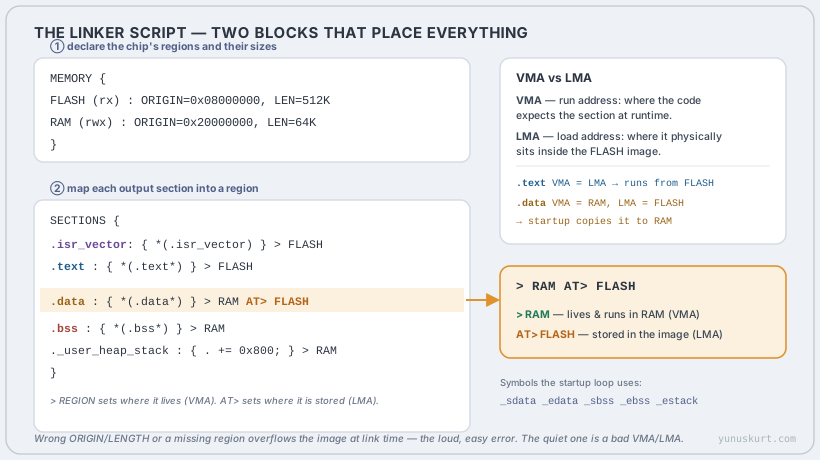 Figure 3 —
 MEMORY declares the regions; SECTIONS places each output section. > RAM AT> FLASH is what gives .data its split run/load addresses, and the _sdata/_ebss symbols are how startup knows what to copy and zero.
MEMORYdeclares the physical regions: name, attributes (rx,rwx),ORIGINandLENGTH. Get these from the datasheet; a wrongLENGTHis how you overflow the part.SECTIONSplaces each output section into a region with> REGION(its VMA). The special> RAM AT> FLASHon.datasets the VMA to RAM but the LMA to FLASH — the split that makes the startup copy possible.- The script also exports symbols —
_sdata,_edata,_sbss,_ebss,_estack— marking section boundaries. The startup code loops between them; that’s the contract between the linker script and the Reset_Handler.
How these actually bite
The failures sort into two kinds — loud and quiet:
- Loud (link time):
region FLASH overflowed by N bytes. WrongLENGTH, or you genuinely don’t fit. The linker tells you exactly. Easy. - Quiet (runtime): firmware links and flashes but faults or misbehaves. Almost
always one of: a vector table not at the start of FLASH (or
VTORnot pointing at it), a startup that doesn’t match the script’s symbols (so.data/.bssaren’t set up), a.dataplaced withoutAT> FLASH(nothing to copy from), or a stack that grew into the heap because you sized RAM optimistically.
The map view in your build’s .map file (and the arm-none-eabi-size summary) is the
ground truth: it lists every section’s address and size. When something boots wrong,
read the map before you read the code.
Field notes
- Open the
.mapfile once per project. Seeing.datawith a RAM VMA and a FLASH LMA, and.bsstaking zero FLASH, makes Figures 1–3 concrete in a way no article can. arm-none-eabi-size firmware.elfgives youtext/data/bssat a glance —text+datamust fit FLASH,data+bssmust fit RAM. Check it in CI.- A global that’s wrong only sometimes is a
.bss/.datastartup bug, not a logic bug. Suspect the Reset_Handler and the linker symbols first. - Stack overflow is silent on most MCUs. Size the stack with the
.mapand a high-water-mark fill pattern; on M-class parts, set theMSPLIMregister if you have it. - Don’t hand-edit the vendor linker script without understanding
AT>. Moving.datato “> RAM” alone (droppingAT> FLASH) compiles, links, and bricks — the classic quiet failure. The same care applies when you place a bootloader and application at different origins.