MQTT explained: pub/sub, brokers and Mosquitto
If you wire a handful of sensors to one server with HTTP, it works. Wire a few thousand devices — flaky cellular links, devices that sleep, new dashboards added every week — and request/response starts to hurt: every client has to know every server’s address, somebody has to poll, and a dropped connection loses data. MQTT was built for exactly this. It’s a tiny publish/subscribe protocol, designed in 1999 for oil-pipeline telemetry over expensive satellite links, that has become the default messaging layer of the IoT. The whole protocol fits in a few kilobytes of code, the smallest packet is 2 bytes, and it assumes the network is bad.
The shift: from talking to each other to talking to a broker
HTTP is point-to-point. A client opens a connection to a specific server, asks, gets an answer, and the relationship is direct — both sides are coupled by address, by timing, and by being online at the same moment. MQTT removes that coupling entirely by putting a broker in the middle. Devices never address each other; they only talk to the broker.
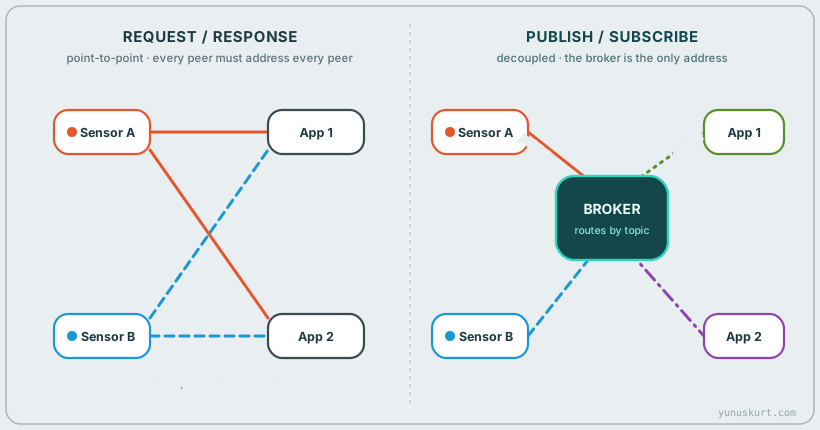 Figure 1 — Request/response couples every consumer to every producer. Pub/sub routes everything through a broker: publishers and subscribers never know each other exist.
A publisher sends a message to a topic. A subscriber tells the broker which topics it cares about. The broker’s one job is to match the two and deliver. This single indirection buys three things that matter enormously at scale:
- Decoupling in space — a publisher doesn’t know who (if anyone) is listening, or how many. Add a tenth dashboard and no device changes.
- Decoupling in time — with sessions and retained messages, a subscriber that was offline can still get the last value or its queued messages when it reconnects.
- Decoupling in synchronisation — publishing is fire-and-forget from the app’s point of view; nobody blocks waiting for a reply.
The connection itself is a single long-lived TCP socket (with TLS, port 8883) that the client opens outbound to the broker. That’s why MQTT sails through NAT and firewalls where inbound HTTP can’t: the device dials out and keeps the line open, and messages flow both ways over it.
Topics and wildcards: the routing key
A topic is just a UTF-8 string with /-separated levels — home/livingroom/temp,
factory/line3/motor/rpm. There’s no need to register or pre-declare topics; you
publish to one and it exists. The hierarchy is a convention that pays off when
subscribers use wildcards to match whole branches of the tree.
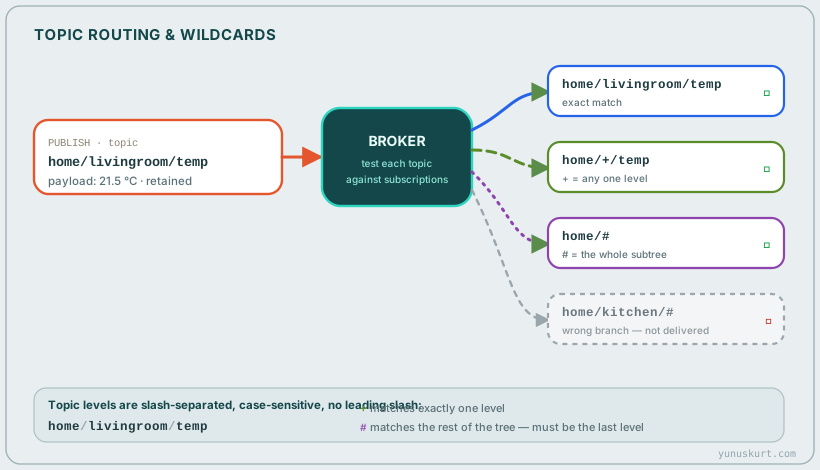 Figure 2 — The broker matches each published topic against every subscription filter.
 + matches exactly one level; # matches the rest of the tree and must come last.
Two wildcard characters, for subscriptions only (you never publish to a wildcard):
+matches exactly one level.home/+/tempcatcheshome/livingroom/tempandhome/bedroom/temp, but nothome/livingroom/floor/temp.#matches everything below this point and must be the final character.home/#catches the wholehomesubtree at any depth.
Good topic design is mostly discipline: put the things you’ll want to filter on into
the level structure (site/line/machine/metric), keep them lowercase and stable, and
don’t put data in topics that belongs in the payload. The payload itself is
opaque bytes to the broker — almost everyone sends small JSON, but it can be a raw
binary struct, Protobuf, or a single number.
Quality of Service: how hard the broker tries
TCP already guarantees bytes arrive in order while the connection is up — but connections drop, devices sleep, and a publish can be lost in the gap. MQTT layers its own delivery guarantee on top, chosen per message, called QoS:
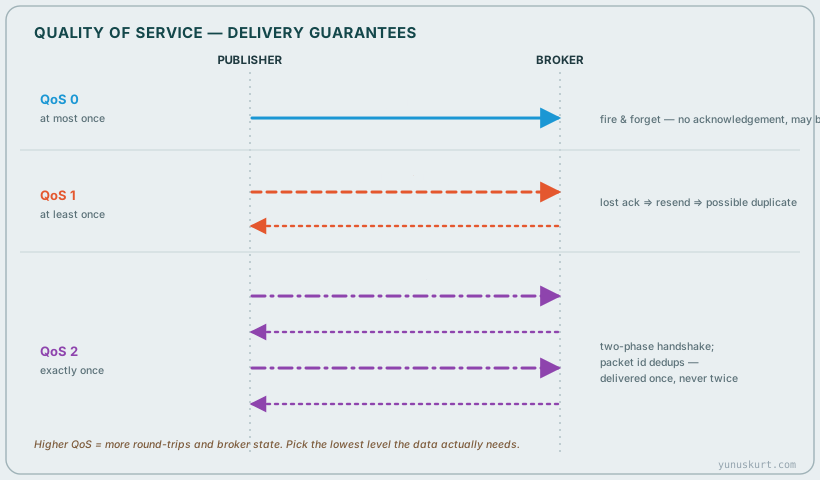 Figure 3 — QoS is a per-message promise. 0 is fire-and-forget, 1 guarantees arrival but may duplicate, 2 guarantees exactly-once via a four-step handshake.
- QoS 0 — at most once. The publish is sent and forgotten. No ack, no retry. If the link drops at the wrong moment, it’s gone. Perfect for high-rate telemetry where the next sample is along in a second anyway.
- QoS 1 — at least once. The receiver sends a
PUBACK. If the sender doesn’t see it, it resends with aDUPflag — so the message will arrive, but the receiver may see it twice. Fine when your handling is idempotent. - QoS 2 — exactly once. A four-packet handshake (
PUBLISH → PUBREC → PUBREL → PUBCOMP) lets both sides track the packet id and guarantee the message is delivered precisely once. It’s the safest and the most expensive — two round-trips and stored state on both ends.
The QoS between publisher→broker and broker→subscriber is negotiated independently; the effective delivery is the lower of what the publisher sent and what the subscriber asked for. The engineering rule: use QoS 0 for cheap, frequent data; QoS 1 for commands and events you can’t lose but can de-dupe; reserve QoS 2 for the rare message where a duplicate would actually be harmful (a billing tick, a “fire the actuator once” command).
The features that make it feel alive
Three small mechanisms do most of the heavy lifting in real deployments:
- Retained messages. Normally the broker forwards a message to whoever is subscribed right now and then drops it. Set the retain flag and the broker keeps the last message on that topic, handing it to any future subscriber the instant it subscribes. This is how a dashboard shows the current temperature the moment it connects, instead of waiting for the next reading.
- Last Will and Testament (LWT). When a client connects it can register a message
for the broker to publish on its behalf if it disconnects ungracefully. So a device
publishes
status: online(retained) at connect, registers an LWT ofstatus: offline, and the moment its keep-alive lapses the broker announces it’s gone — instant presence detection with zero polling. - Keep-alive. The client promises to send something within a keep-alive interval;
if it has no data it sends a 2-byte
PINGREQ. Miss it and the broker declares the client dead and fires its LWT. This is what makes “is the device still there?” answerable over a connection that’s mostly idle.
Sessions tie these together. With a clean session the broker forgets everything when you disconnect. With a persistent session (MQTT 5 calls it a session expiry interval) the broker remembers your subscriptions and queues your QoS 1/2 messages while you’re away, delivering them on reconnect — so a device that drops off cellular for a minute doesn’t miss its commands.
MQTT 3.1.1 vs 5.0
MQTT 3.1.1 is the workhorse — universally supported, dead simple. MQTT 5.0 (2019) is backward-compatible in spirit and adds the things large fleets were missing:
- Reason codes on every ack, so a failed subscribe or publish tells you why instead of silently dropping the connection.
- User properties — arbitrary key/value metadata on a message, like HTTP headers.
- Topic aliases — send a long topic once, then refer to it by a small integer to save bytes on every subsequent publish.
- Shared subscriptions (
$share/group/topic) — multiple clients in a group split the messages between them, which is how you load-balance consumers. - Message expiry, session expiry, request/response patterns and cleaner flow control.
For a small project, 3.1.1 is perfectly fine. For a managed fleet, the diagnostics and shared subscriptions in 5.0 are worth adopting.
Security: it’s TCP, so use TLS
MQTT itself carries no encryption — security is the transport plus the broker’s auth.
In production that means three layers: TLS (port 8883) for confidentiality and to
authenticate the broker (and optionally the client, via mutual-TLS certificates);
username/password at the CONNECT stage for client identity; and ACLs —
broker rules that say this client may only publish/subscribe to these topic
patterns. The classic incident is an MQTT broker left open on port 1883 with no
auth and allow_anonymous true — there are search-engine-indexed brokers leaking live
factory and home data right now. Don’t be one of them.
The broker is the whole game — and Mosquitto is where most people start
Everything above is implemented by the broker, so picking one matters. Eclipse Mosquitto is the natural starting point: a single small C binary, open-source, runs on anything from a Raspberry Pi to a big server, and it’s the de-facto reference. It speaks MQTT 3.1.1 and 5.0, does TLS, auth, ACLs, retained messages and bridging.
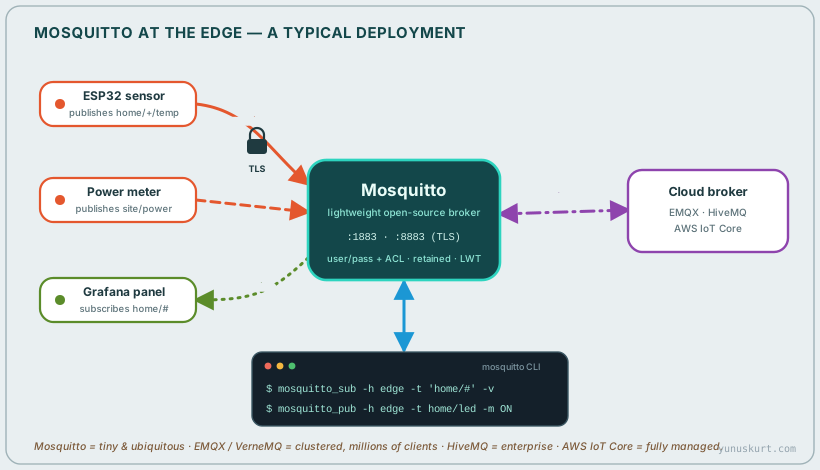 Figure 4 — A typical edge deployment: devices and dashboards talk to a local Mosquitto over TLS, the
 mosquitto_pub/mosquitto_sub CLI tools test and script it, and a bridge forwards selected topics up to a cloud broker.
The fastest way to feel MQTT is the two CLI tools that ship with Mosquitto. In one
terminal, subscribe to everything under home and print it:
mosquitto_sub -h localhost -t 'home/#' -vIn another, publish a reading:
mosquitto_pub -h localhost -t home/livingroom/temp -m '21.5' -rThe -v makes the subscriber print topic payload; the -r marks the message
retained, so the next subscriber to join sees 21.5 immediately. That’s the whole
protocol in two commands.
A minimal hardened mosquitto.conf looks like:
listener 8883
certfile /etc/mosquitto/certs/server.crt
keyfile  /etc/mosquitto/certs/server.key
cafile   /etc/mosquitto/certs/ca.crt

allow_anonymous false
password_file /etc/mosquitto/passwd
acl_file /etc/mosquitto/aclfile

persistence true
persistence_location /var/lib/mosquitto/
— TLS on, anonymous off, a password file (built with mosquitto_passwd), per-client
ACLs, and persistence so retained messages and sessions survive a restart.
Bridging is Mosquitto’s other superpower: one broker can be configured as a client
of another and forward a chosen set of topics. That’s how an edge Mosquitto on a
factory floor mirrors just factory/line3/# up to a central or cloud broker, keeping
local traffic local while still feeding the cloud.
When you outgrow a single node, the landscape opens up: EMQX and VerneMQ cluster across many nodes for millions of concurrent clients; HiveMQ targets enterprise with extensions and a polished control plane; NanoMQ is built for ultra-constrained edge gateways; and AWS IoT Core, Azure IoT Hub and HiveMQ Cloud are fully managed brokers where you bring the devices and they run the infrastructure. The protocol on the wire is identical — that’s the point. You can prototype on Mosquitto and move to a managed cluster without touching device firmware.
MQTT or HTTP?
They’re not really competitors, but the dividing line is clear. Reach for MQTT when you have many devices, frequent or bidirectional messages, unreliable or metered links, sleeping nodes, or a need to fan one event out to many consumers — i.e. telemetry and control. Reach for HTTP/REST for request/response against a service, large file transfers, and stateless interactions with web infrastructure that already speaks it. Plenty of real systems use both: MQTT for the live device firehose, HTTP for provisioning, config and bulk pulls.
Field notes
- Start with one retained
statustopic and an LWT per device. Presence detection for free is the feature people most regret skipping. - Pick QoS per message, not per project. Defaulting everything to QoS 2 “to be safe” just doubles your round-trips and broker state for no real gain.
- Design topics for the subscriber’s wildcards, not the publisher’s convenience —
site/line/machine/metricso a dashboard can grabsite/line3/#. - Never ship
allow_anonymous true. TLS + password + ACL is the baseline, and mutual-TLS for anything that leaves your own network. - Bridge at the edge. A local Mosquitto keeps the shop-floor working even when the uplink is down, and forwards only what the cloud actually needs.
- The payload is yours, not the broker’s. Keep it small and self-describing (compact JSON or a versioned binary), because every device and dashboard has to agree on it without the broker’s help.
MQTT’s whole trick is that one structural choice — a broker in the middle, pub/sub instead of request/response — and everything else (QoS, retained, LWT, bridging) falls out of it. If you’re building anything with more than a handful of networked devices, it’s almost always the right backbone, and Mosquitto is fifteen minutes from running. For the wireless links underneath it, see Wi-Fi, BLE and LoRa; for the industrial protocols it often sits alongside, Modbus.